Egress Agent
Package name: intrudect-egressagent
During various penetration tests, it has been frequently observed that so-called "air-gapped" networks are not fully isolated. This inspired the egress agent module.
The agent is installed into isolated network segment and periodically attempts to access the Internet. If it successfully connects to the Intrudect servers, an alert is sent to the client.
Configuration
The initial default configuration for Egress Agent can be created in the web UI
under Agents > Add new egress agent. After saving and downloading it, store the configuration on
the machine running the agent at /opt/intrudect-egressagent/etc/config.json.
Methods
-
DirectICMPattempts tunneling over ICMP using both IPv4 and IPv6. ICMP or IPv6 configurations are often forgotten as well. -
DirectHTTPandDirectHTTPSattempt to reach the Intrudect HTTP egress servers with ordinary HTTP(S) requests, across the configuredHTTP.Ports/HTTPS.Ports. Web proxies and content filters frequently allow outbound HTTP even when other protocols are blocked. See HTTP egress below. -
DNS methods (
PublicDNS,DefaultDNS, andPrivateDNS) test connectivity via both UDP and TCP, and IPv4 and IPv6. Many isolated networks still respond to DNS queries. -
FindGW,FindDNSandFindProxymethods are noisy, scanning internal networks for other hosts and trying outbound connection via these hosts.FindProxydiscovers proxies on the internal network and attempts to break out through them using HTTPCONNECT, SOCKS4, and SOCKS5.
"Methods": {
    "DirectUDP": true,
    "DirectTCP": true,
    "DirectICMP": true,
    "DirectHTTP": true,
    "DirectHTTPS": true,
    "PublicDNS": true,
    "DefaultDNS": true,
    "PrivateDNS": true,
    "FindGW": true,
    "FindDNS": true,
    "FindProxy": false
  },
Note
DirectHTTP and DirectHTTPS default to true when omitted from the configuration file. Set them explicitly to false to disable HTTP egress testing.
Sleep
Seconds to sleep after each method has completed its run cycle.
"Sleep": {
    "AfterUDPScan": 60,
    "AfterTCPScan": 60,
    "AfterICMPScan": 60,
    "AfterDNSScan": 60,
    "AfterHTTPScan": 60,
    "AfterProxyScan": 60,
    "AfterGWScan": 60,
    "AfterNmapScan": 1440
  },
Threads
Several methods can be used to send traffic from isolated networks.
DirectTCPandDirectUDPmethods will attempt to use all ports across both IPv4 and IPv6. Administrators commonly overlook UDP or IPv6 configurations. Given that there are 4 x 65535 ports to test, scanning is done using parallel processing as defined here:
HTTP egress
The DirectHTTP and DirectHTTPS methods send HTTP(S) probes to the Intrudect
HTTP egress servers (PrivateHTTPServers) and to the Home.ServerURI collector.
A successful probe that receives the expected acknowledgement confirms a breakout.
Each server is tried on every port listed under HTTP.Ports (for DirectHTTP)
and HTTPS.Ports (for DirectHTTPS).
When FindProxy is enabled, any proxy discovered on the internal network is also
used to relay these HTTP probes and the "home" alert, attempting HTTP CONNECT,
SOCKS4, and SOCKS5. The ports scanned for proxies are listed under Proxy.Ports.
"Proxy": {
    "Ports": [80, 443, 8000, 8080, 8081, 8118, 8888, 3128, 3129, 1080]
  },
"HTTP": {
    "Ports": [80, 8080, 8000, 8888]
  },
"HTTPS": {
    "Ports": [443, 8443]
  },
Proxy.Ports- ports scanned on discovered internal hosts when looking for a usable proxy (used byFindProxy).HTTP.Ports- ports used forDirectHTTPprobes.HTTPS.Ports- ports used forDirectHTTPSprobes.
Each list defaults to the values shown above when omitted. Ports must be within
1..65535 and must not repeat within a list.
Other options
If using Intrudet public egress servers, then DO NOT modify following parameters.
LogDomains- domains with logging nameservers for DNS egress.EgressServers- IPv4 and IPv6 addresses for public Intrudect egress serversPrivateDNSServers- IPv4 and IPv6 addresses for public Intrudect DNS serversPublicDNSServers- list of public DNS server addresses that are tested for egress.PrivateHTTPServers- IPv4/IPv6 addresses and hostnames of the public Intrudect HTTP egress servers, used byDirectHTTP/DirectHTTPS.
Internal web server
The agent can expose a small read-only status web UI and JSON API on the local machine. It shows the running workers, recent log lines, runtime statistics (goroutines, memory, free disk, load average), the enabled methods, and the configured endpoints and ports. It is useful for confirming on the isolated host that the agent is alive and doing what is expected. It never exposes secrets or the configuration file contents.
It is disabled by default. Enable it under InternalHTTP:
"InternalHTTP": {
    "Enabled": false,
    "Listen": "127.0.0.1:8085",
    "Auth": {
      "Mode": "open",
      "BasicFile": "/opt/intrudect-egressagent/etc/basic.htpasswd",
      "BearerFile": "/opt/intrudect-egressagent/etc/bearer.tokens"
    }
  },
Enabled- set totrueto start the internal server.Listen-host:portto bind. Defaults to127.0.0.1:8085. Keep it bound to a local or management address; the server has no TLS of its own, so put a reverse proxy in front of it if you need to reach it remotely over HTTPS.
Endpoints
| Path | Description |
|---|---|
/ |
HTML status dashboard. |
/api/v1/status |
Full status document (runtime, workers, logs, config) as JSON. |
/api/v1/logs |
Recent log entries as JSON. |
/api/v1/goroutines |
Runtime statistics and worker states as JSON. |
Authentication
Authentication is optional and controlled by Auth.Mode:
| Mode | Behaviour |
|---|---|
open |
No authentication (default). Only use when Listen is bound to a trusted local address. |
basic |
HTTP Basic auth against Auth.BasicFile. |
bearer |
Authorization: Bearer <token> against Auth.BearerFile. |
Basic auth file (BasicFile) — one username:hash per line. Supported hash
formats are {SHA}, $apr1$ (Apache MD5), and plaintext. Blank lines and lines
starting with # are ignored.
You can generate an entry with htpasswd:
Bearer token file (BearerFile) — one token per line. Blank lines and lines
starting with # are ignored.
Alerting
Multiple servers and domains receive and decrypt traffic from Egressagent. This decrypted information includes the client web UI's address. An alert is then forwarded to that address.
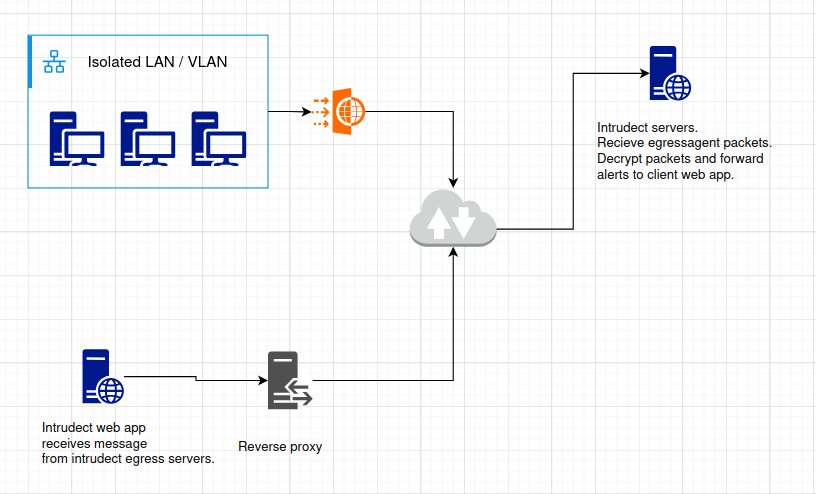
Reverse proxy needs to only expose /api/alert/new uri.
server {

    ...

    location /api/alert/new {
        proxy_pass http://127.0.0.1:8080;
        proxy_redirect off;
        proxy_ssl_verify off;
        proxy_bind 127.0.0.1;
        proxy_set_header Host $host;
        proxy_set_header X-Forwarded-For $proxy_add_x_forwarded_for;
        proxy_set_header CF-Connecting-IP $remote_addr;  # Set CF header in case needed
    }
}